



























Evasive Linux Malware and Backdoor Detection Presentation
Evasive Linux malware and backdoor detection presentation featuring BPFDoor and command line forensics.
14 min read

Publication Date: 15 February 2026
BPFDoor is a simple but stealthy Linux backdoor linked to Chinese nation state threat actors. While often found targeting telecommunications infrastructure, it is likely used in other critical infrastructure breaches around the world. This document details detection of BPFDoor versions 1 and 2 by Sandfly Security’s agentless intrusion detection and incident response platform.
We strongly urge customers to let Sandfly do agentless hunts for this threat to avoid missing any compromised systems. Sandfly works across nearly all Linux distributions including modern systems, 10+ year old legacy systems, and even embedded devices without deploying endpoint agents. Sandfly can find BPFDoor in seconds saving countless hours of time using risky scripts and manual work.
The original BPFDoor has existed for some time and was able to remain unnoticed due to the low-key nature of how it worked and the lack of monitoring on most Linux systems. Sandfly wrote an in-depth technical overview of BPFDoor back in 2022. The complete technical breakdown of what it did is outlined in our original research below:
BPFDoor - An Evasive Linux Backdoor Technical Analysis
We also made a video presentation about the operation of this backdoor along with slides:
The above analysis covered Version 1 of this backdoor. Version 2 of BPFDoor was recently discussed by Haxrob in his two part blog:
The two backdoors have largely similar functions with changes to evade some detection in the Version 2 variants. The main change for Version 2 is that the new versions incorporate much stronger public/private key encryption. The new version’s stronger encryption prevents network monitoring and also unauthorized use by anyone except the operators that installed it.
BPFDoor waits for a “magic packet” to arrive on any port of the victim system once installed. The magic packet is a specially crafted network packet on the TCP, UDP or ICMP protocols that contains a string sequence and password to activate the backdoor. Without any magic packet received, the backdoor sits quietly using negligible system resources to not draw any attention to itself.
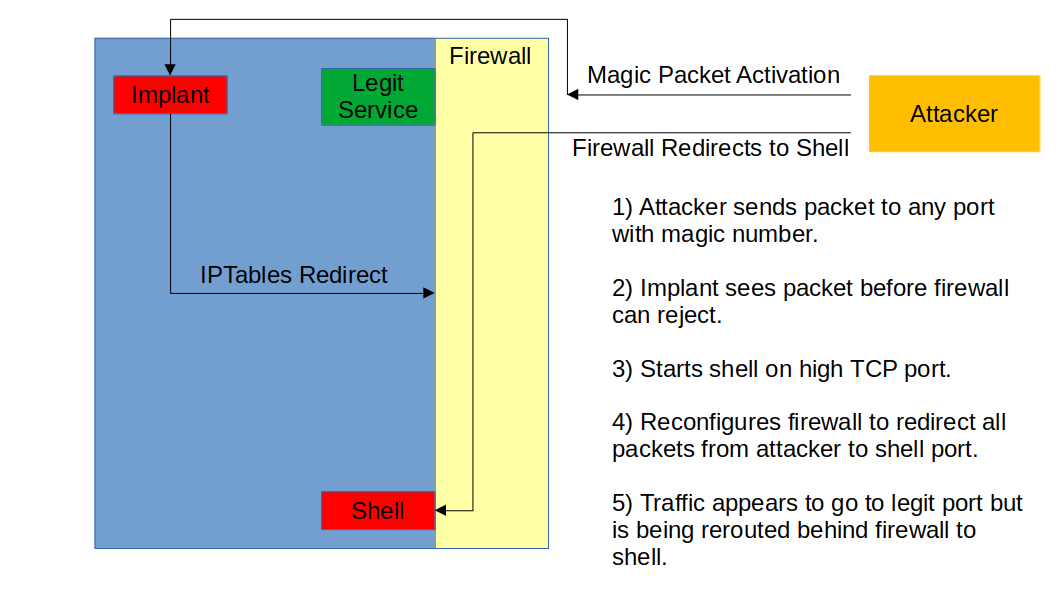
Once a magic packet is seen by the backdoor, it will reconfigure the local firewall to either start a bind shell backdoor that the attacker then connects to, or start a reverse shell back to the attacker. More critically, the attacker can communicate on the port it sent the original packet on. Meaning that if the victim is running a webserver on port 443 with encrypted traffic, the attacker can send a packet to port 443 and start an encrypted backdoor session to blend in with other traffic. Any port can be used in this way.
The important thing to understand is that it does not matter if the system has a local firewall configured to drop unauthorized packets. The backdoor will intercept the packets before the firewall has dropped them and activate. The firewall will not prevent the backdoor from activating once it sees a packet.
The above point is significant because a system that operators think is protected against unauthorized traffic by a firewall can in fact be accessed. The diagram below shows the basic operation of this mechanism for the bind shell backdoor from Version 1. If a reverse shell is requested instead of a bind shell, the backdoor will initiate a connection potentially bypassing packet filters that do not restrict traffic outbound.
In both cases, the attacker can hit any open or closed port and cause the backdoor to activate. The attacker can hit an open port, such as a webserver, to blend into normal traffic. Or, they can hit a closed port that may not be monitored and get access that way.
BPFDoor is a simple but effective backdoor because it limits its features to the bare minimum for the job, and incorporates simple hiding methods that are reliable across Linux distributions. However, it has several attributes that lend itself to reliable detection:
We’re going to now show you how Sandfly finds the above in all known variants of this backdoor.
Sandfly focuses on the tactics of compromise which makes our detection on Linux more versatile than standard malware signatures. In the case of BPFDoor, we do not try to identify it directly. Instead, we find the tactics of how it works which makes it obvious something serious is happening on the targeted system.
For example, we have Version 1 and 2 of BPFDoor operating on victim hosts. This is what Sandfly alerts on when the backdoor is running but idle (e.g. not running an active shell yet).
BPFDoor has many significant and serious alerts when idle:
process_running_from_dev_dir - A process running from /dev directory.
process_deleted - A process with a deleted binary has been detected on the host.
process_running_sniffer_environ_empty - A network sniffing process is missing its environment.
process_running_sniffer_environ_corrupt - A network sniffing process has a corrupt environment.
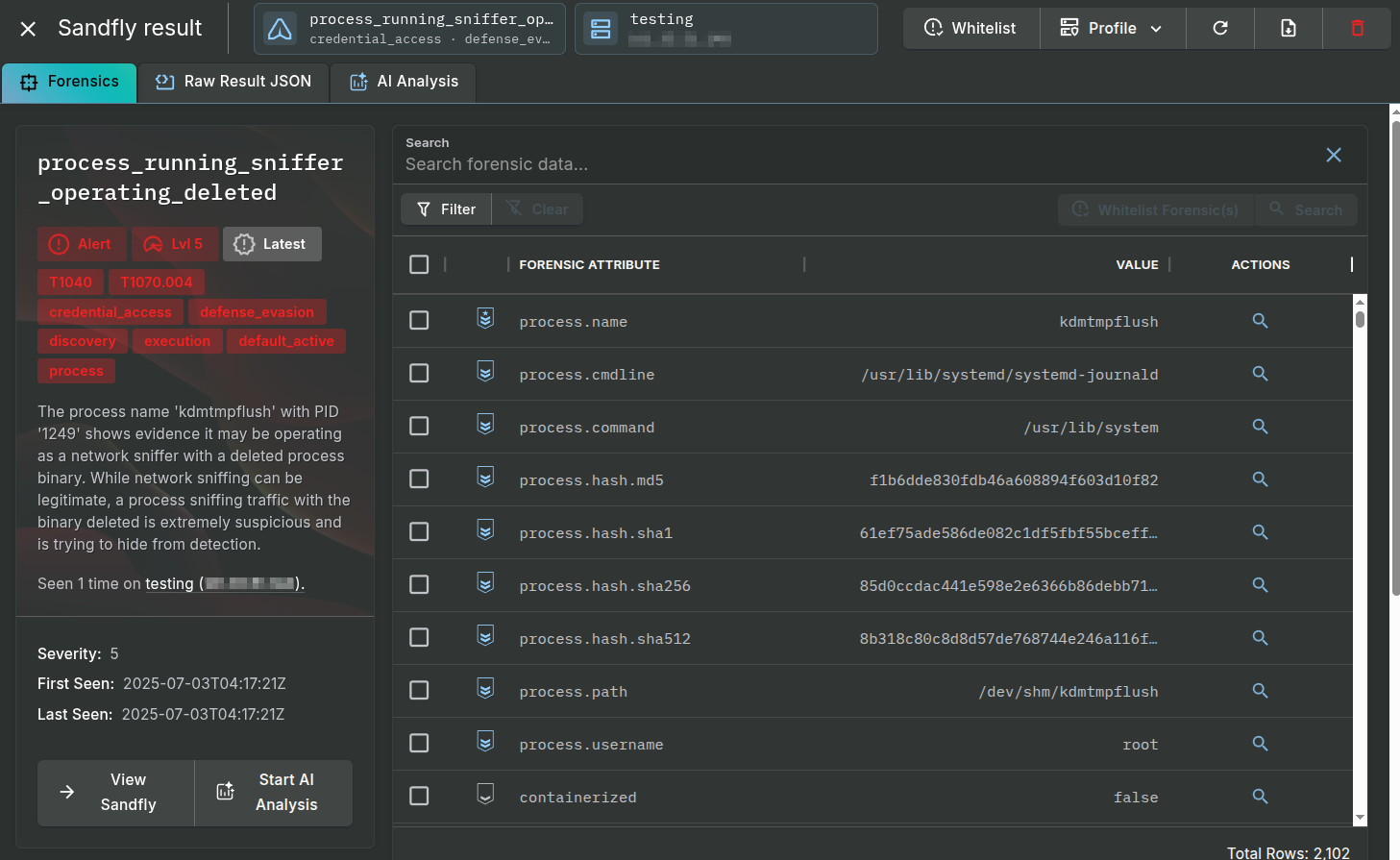
process_running_sniffer_operating_deleted - A process binary that is sniffing traffic has been deleted from the disk.
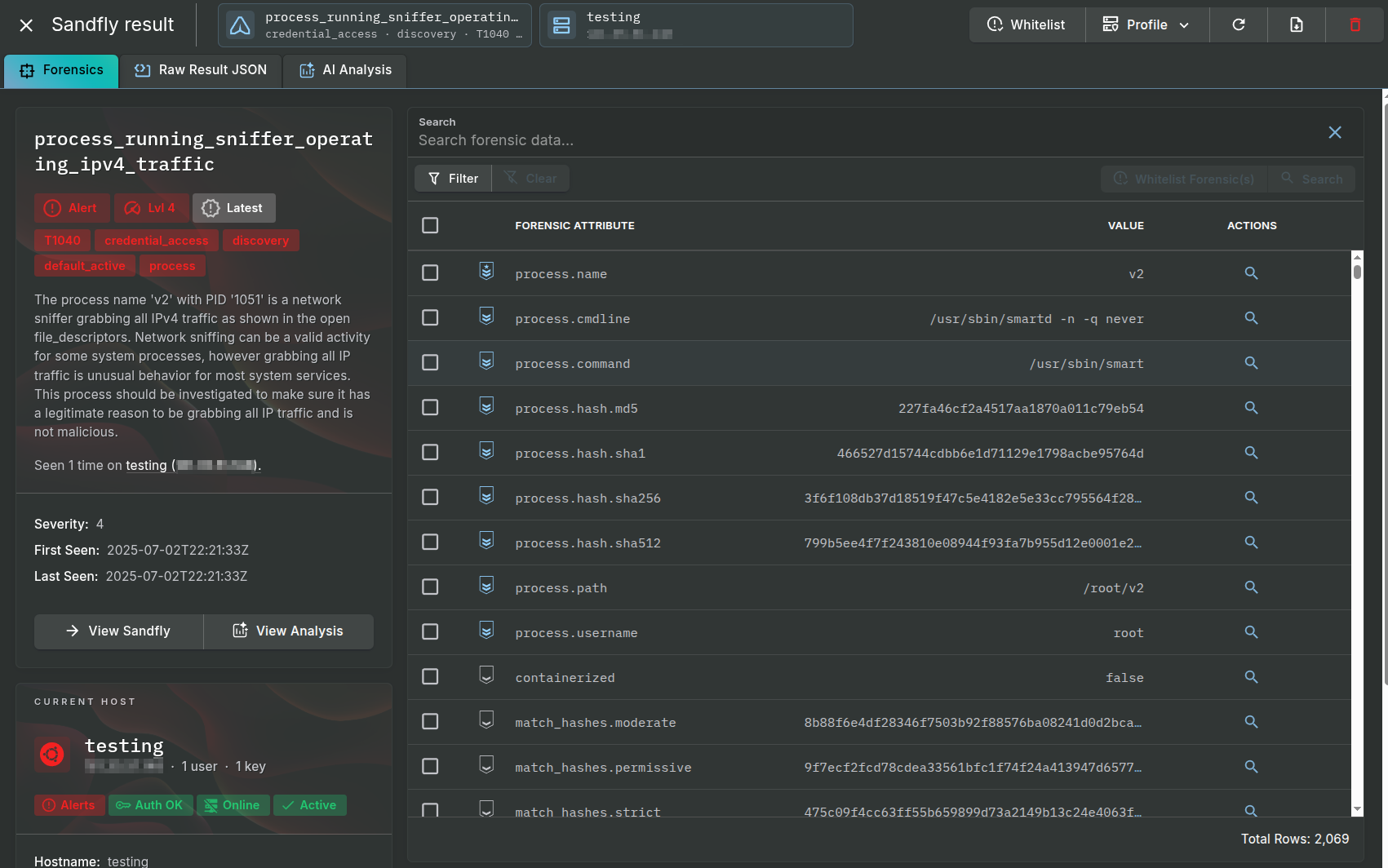
process_running_sniffer_operating_ipv4_traffic - A process is grabbing all IPv4 traffic.
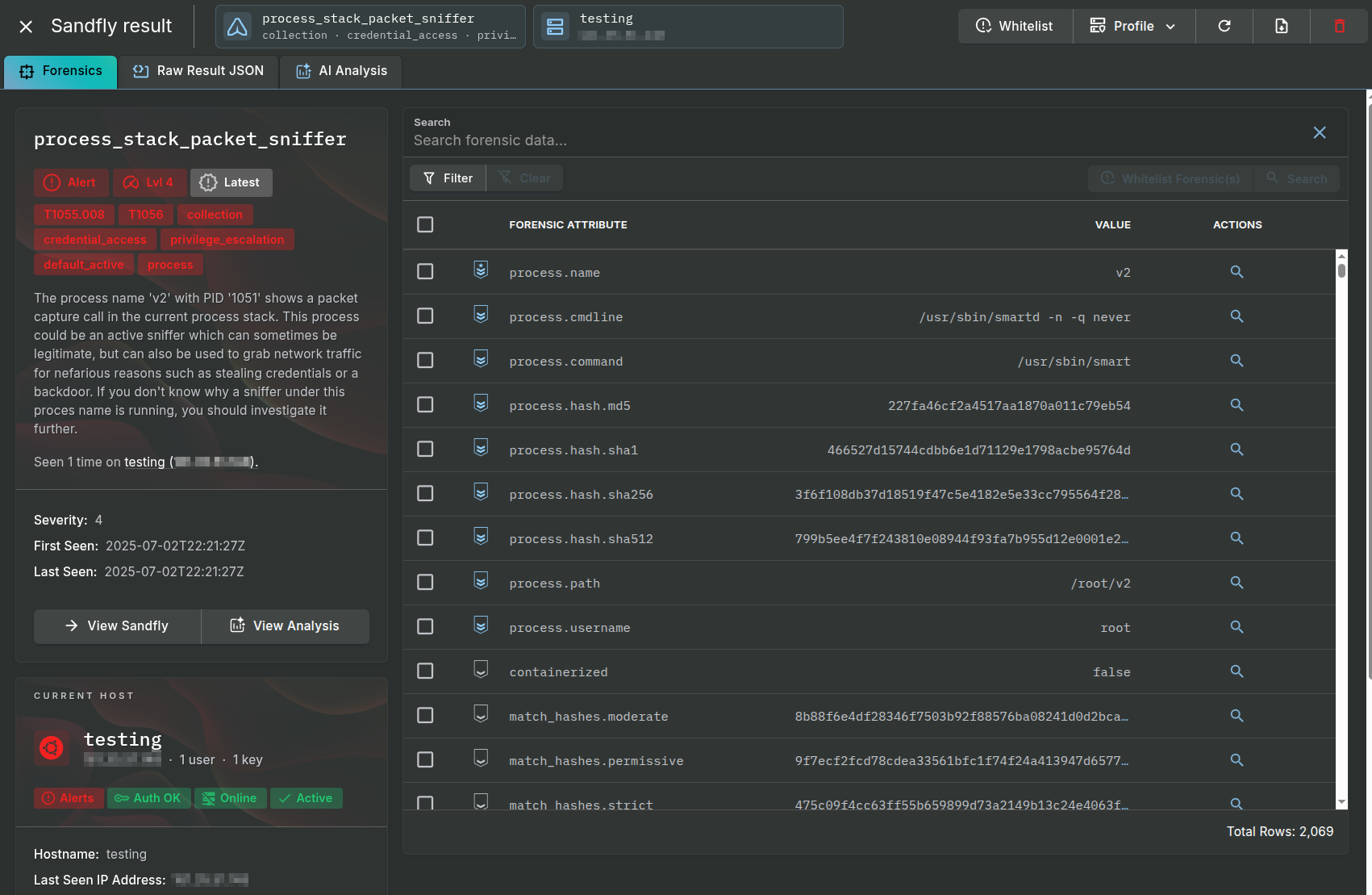
process_stack_packet_sniffer - A process with evidence it is operating as a sniffer in the stack has been detected.
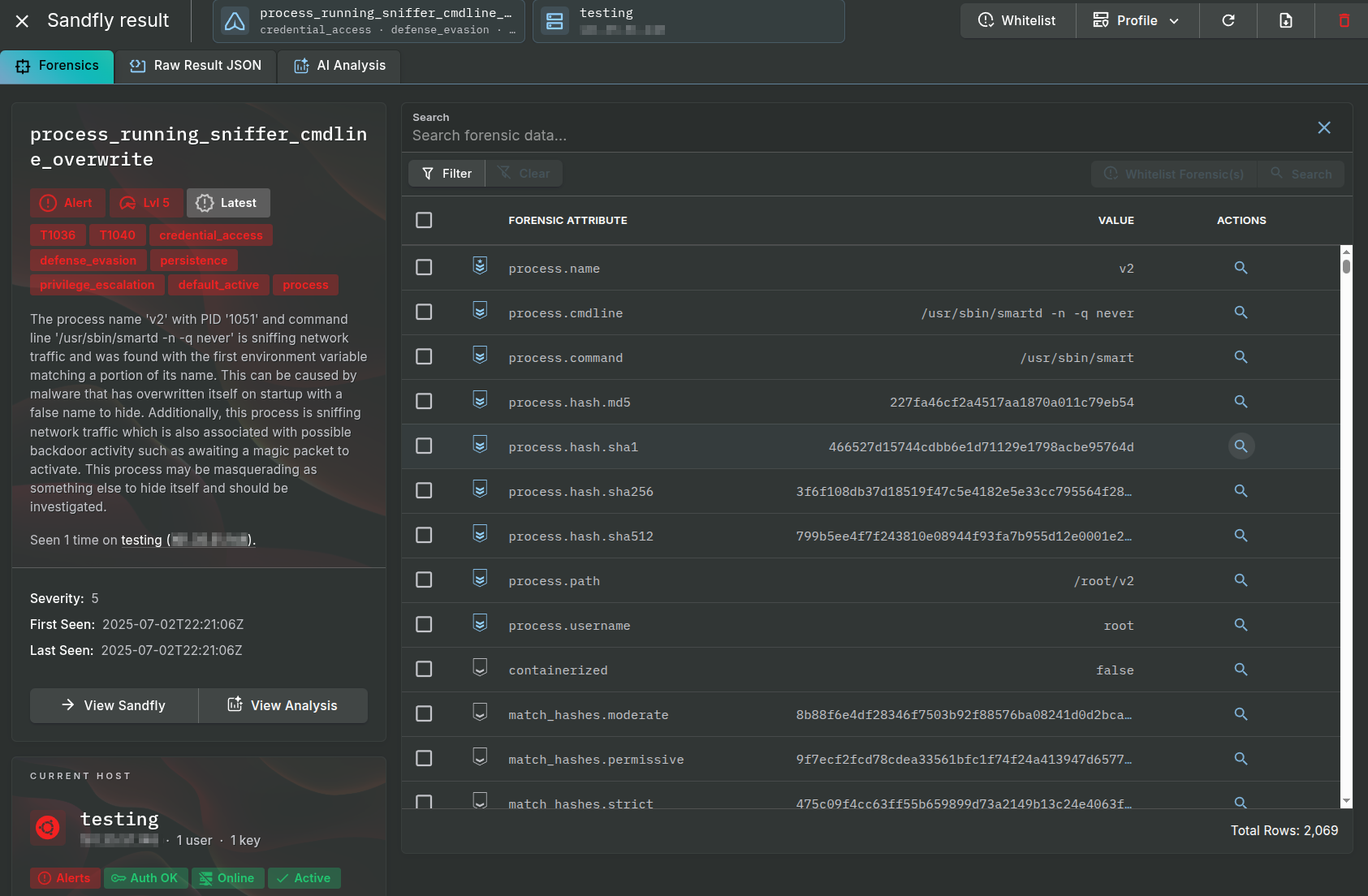
process_running_sniffer_cmdline_overwrite - A process with a suspicious command line has been detected.
recon_process_list_all - Drift detection has found a new process that is not authorized to be running on this host.
recon_process_list_sniffer_operating - Drift detection has found a new process that is sniffing network traffic running on this host.
process_threat_feed_match - A known malware binary hash from a threat feed has been found operating on this host.
The detection process_running_from_dev_dir is related to a series of checks Sandfly does to find processes that are running from suspicious locations on Linux. In general, Linux processes tend to run from system areas such as /bin, /usr/bin, or user installed software areas such as /opt or similar.
The Version 1 of BPFDoor however chose to run from /dev/shm which is a ramdisk area on Linux. This directory is used for temporary storage in memory for files and never for data like binaries that need to remain on the host. Typically the only binaries running from /dev/shm will be malware. This is because the /dev/shm directory is located in RAM so if the system reboots the malware is destroyed and makes recovery and analysis harder. Also, /dev/shm is publicly writable on virtually every single Linux system on the planet. Attackers know a file dropped in the ramdisk have a high chance of not only running, but not being easily seen by casual observers.
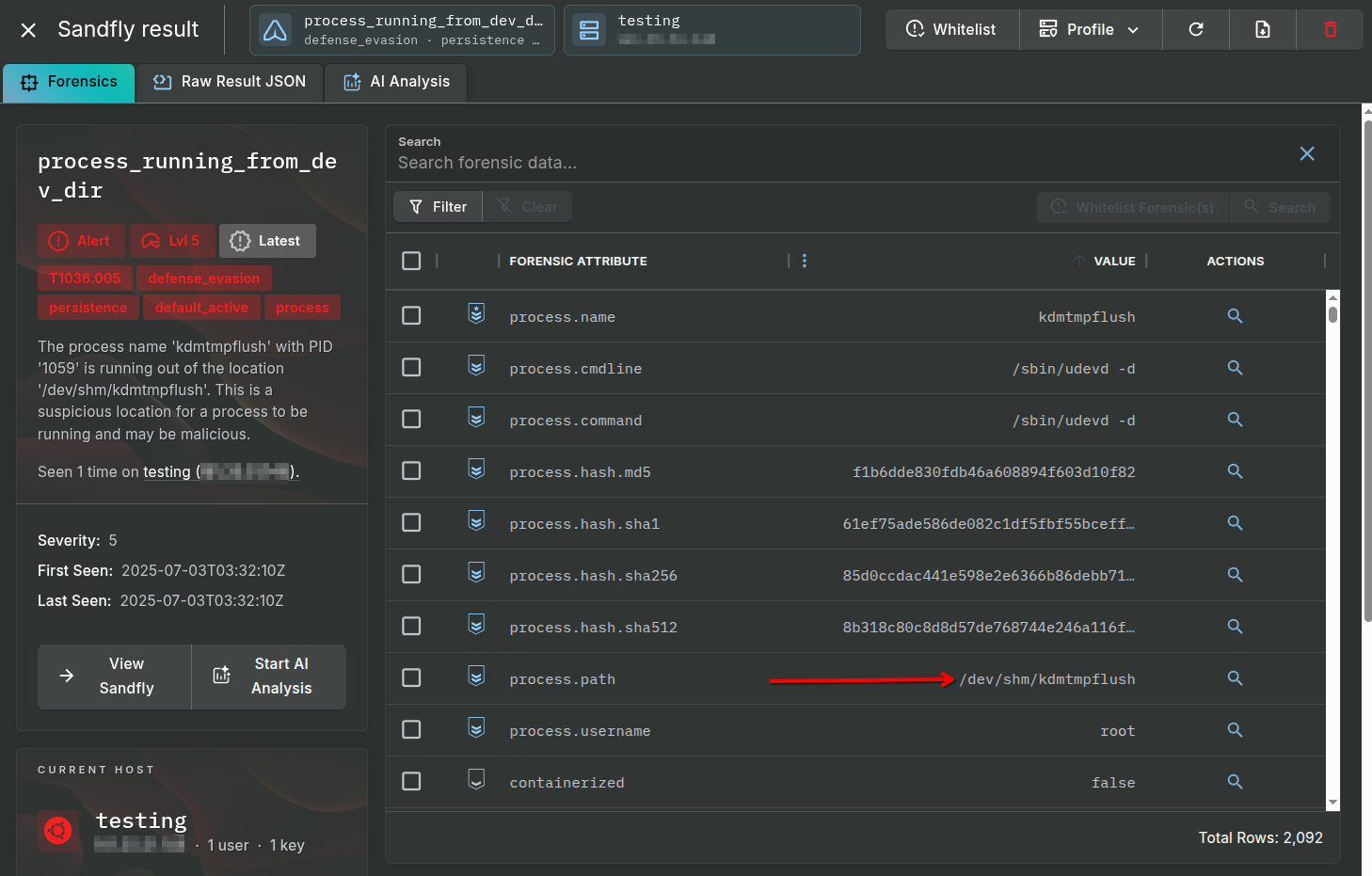
For Version 1 of BPFDoor, Sandfly will show an alert as below for any kind of binary running from the /dev directory and /dev/shm in particular. About 99.9% of the time a binary running from this area is malicious whether it is BPFDoor or something else.
Below we see the alert along with the suspicious process path. Again, any process seen running from this path should be investigated as it is almost always malicious. Because running from /dev/shm is such a huge red flag, Version 2 of BPFDoor did away with this tactic.
Version 1 of BPFDoor often named its process kdmtmpflush. It changed this name after execution (discussed below), but often will be seen in various process lists using this name. The arrow points to the full path used by the Version 1 binary before deleting itself.
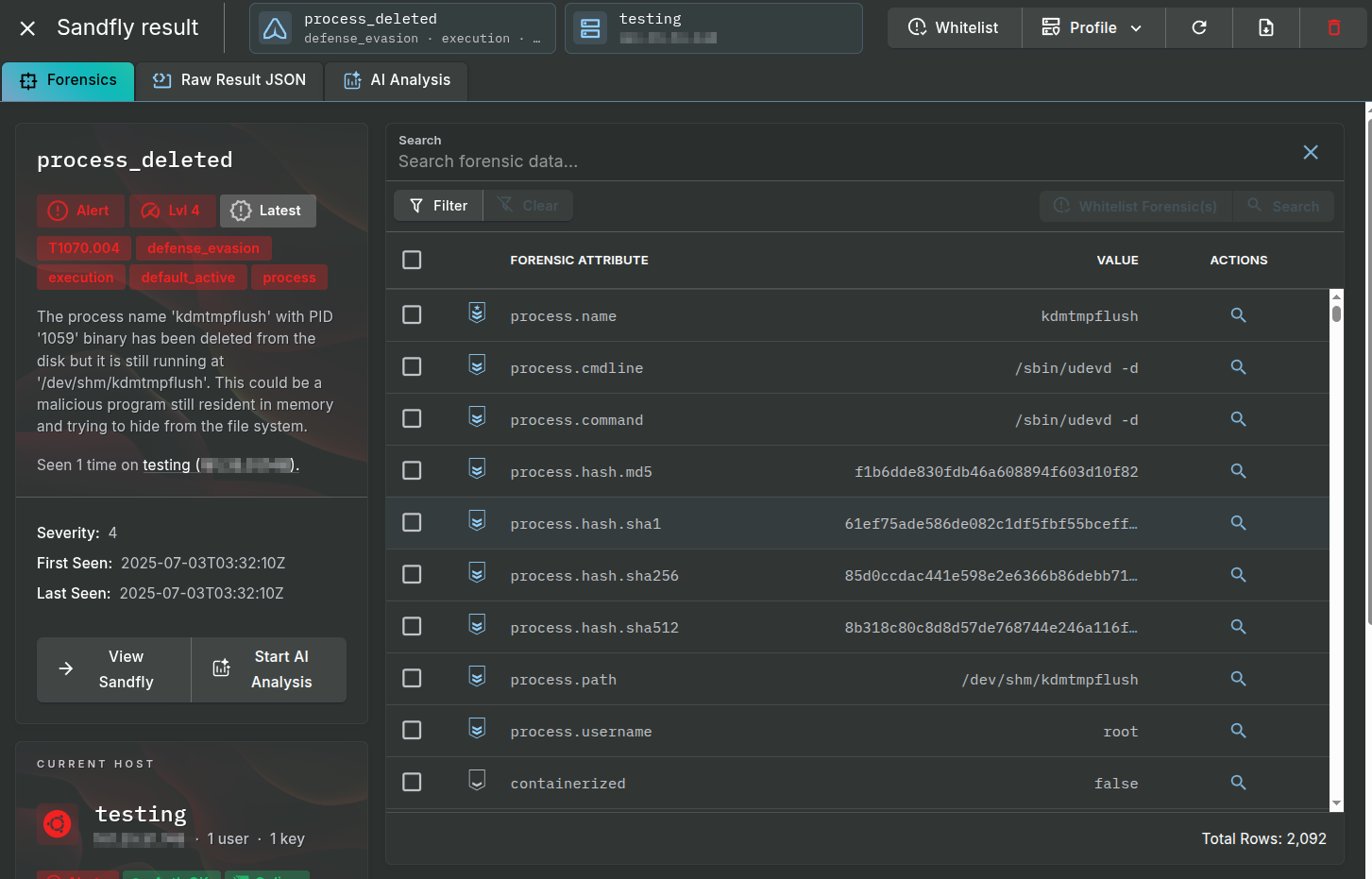
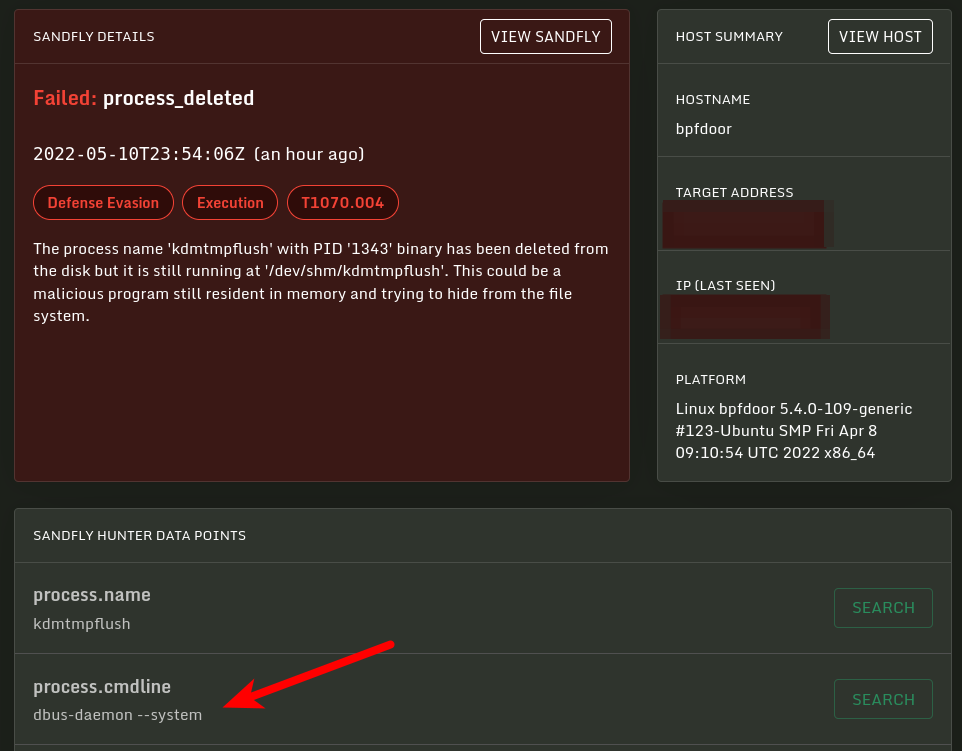
The next alerts we see with Version 1 of BPFDoor is process_deleted. This is a simple alert that means a process is running on the host, but the binary that started the process has been deleted from the disk. This is a simple way for malware to prevent its binary from being discovered by file scanning tools such as anti-virus or file integrity monitoring. Since the binary is not on the disk, traditional file scanning security tools will simply not see it is there even though it continues to run in memory. Sandfly considers this a serious alert, especially when combined with network operations, sniffing traffic, and other attributes.
As it turns out, it is very easy to recover a malicious process binary that has been deleted from the disk. We cover how to do this here:
Recovering a Deleted Process Binary on Linux
Below we see the alert on the process kdmtmpflush along with the masquerading name /sbin/udev -d which the malware selected from a random list of names when it started.
Both versions of BPFDoor have various anti-forensics in the main binary and backdoor shells which wipe the process environment. By wiping the environment it makes root cause analysis of the intrusion more difficult for incident responders.
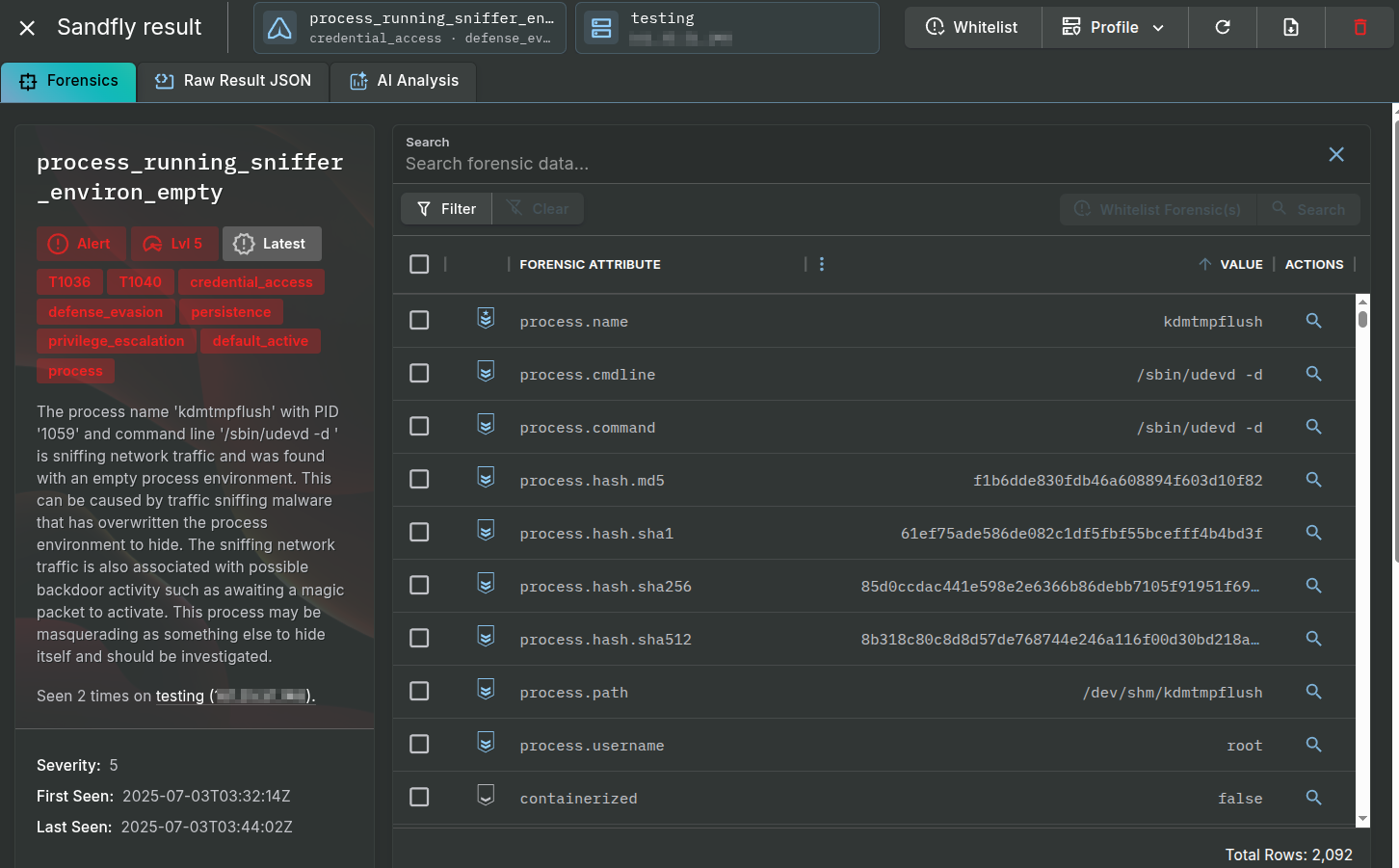
Below we see the alert process_running_sniffer_environ_empty which is present in Version 1 of the backdoor. We alert on this because while some processes on Linux may not have an environment set (such as a kernel thread), it is extremely unusual for a process sniffing network traffic to not have one.
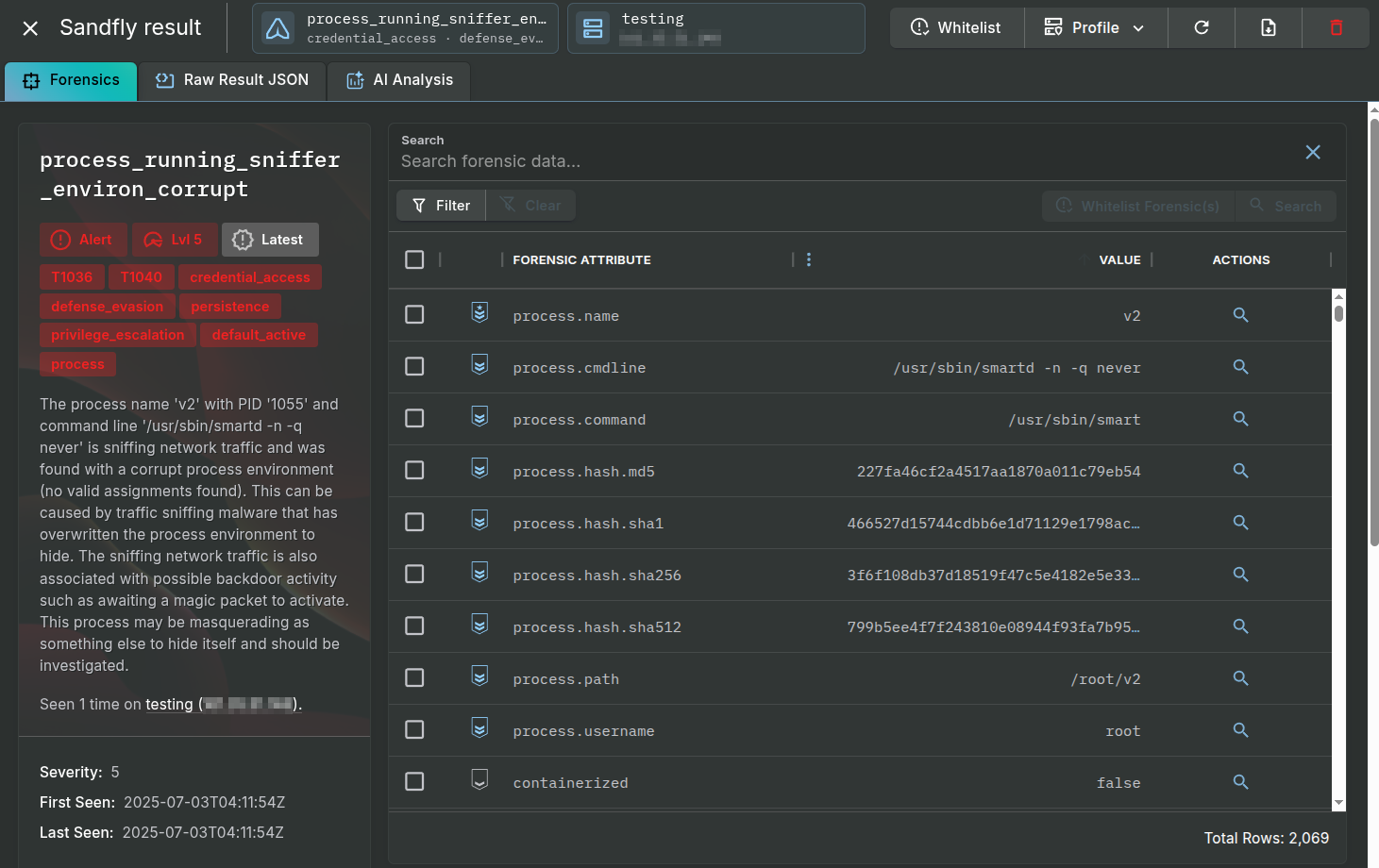
Version 2 of BPFDoor has a corrupt environment due to its process masquerading efforts. Meaning it does wipe its environment like Version 1, but when it hides its name with masquerading it corrupts it in a way that is unusual. We identify this problem as process_running_sniffer_environ_corrupt.
Packet sniffing on Linux can be legitimate for certain network services, but if something is grabbing network traffic for unknown reasons it often is trouble. For BPFDoor, it must grab network traffic in order to see magic packets to activate and this is a primary detection opportunity.
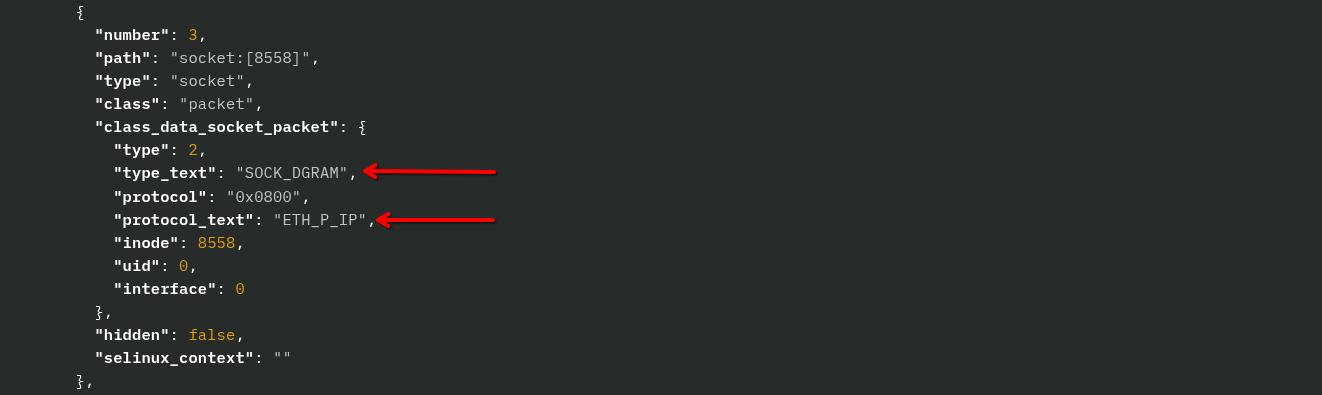
Version 1 of BPFDoor used standard network sniffing sockets, but Version 2 used an unusual method detailed in the blog by HaxRob referenced in the links section. Basically, it took advantage of a poorly documented feature in Linux where a SOCK_DGRAM type socket can also intercept all packets just like traditional SOCK_RAW types. This seemingly minor change meant that conventional methods to spot processes accessing raw sockets that may be grabbing packets would not work.
Sandfly was always able to detect BPFDoor even before it became public in part due to the traffic sniffing anomalies. Version 2 allowed it to hide from some of these earlier detections, but still was being seen by the process_stack_packet_sniffer detection and others.
For Sandfly 5.5 we improved our detection by decoding open file descriptors of processes and what protocols and socket types they are. Specifically, we added the following modules to find these tactics:
process_running_sniffer_operating_ipv4_traffic - Flags any process that is specifically grabbing IPv4 traffic.
process_running_sniffer_operating_ipv6_traffic - Flags any process that is specifically grabbing IPv6 traffic.
process_running_sniffer_operating_unknown_protocol - Flags any process that is grabbing network traffic and an unknown protocol type.
process_running_sniffer_operating_all_traffic - Flags any process that is grabbing all network traffic (disabled by default).
The IPv4 and IPv6 versions are enabled by default as normal system processes would rarely need to grab all IPv4 and IPv6 traffic.
The detection for unknown protocols is a catch-all for possible malware which may be operating with obscure settings to avoid network monitoring.
The detection for processes grabbing all traffic may cause false positives on certain default system services (e.g. DHCP servers), but can be useful for incident response teams once they whitelist the known good processes. They can in essence profile everything grabbing network traffic, sort out what they expect, and then investigate what is left. Again, this is disabled by default but can be enabled if teams wish to use it.
Below is a detection of the Version 2 of BPFDoor with these improved detections in Sandfly 5.5 and higher. BPFDoor is running under the false name /usr/sbin/smartd -n -q never. Version 2 of BPFDoor may use different names depending on the build, but this name has been common.
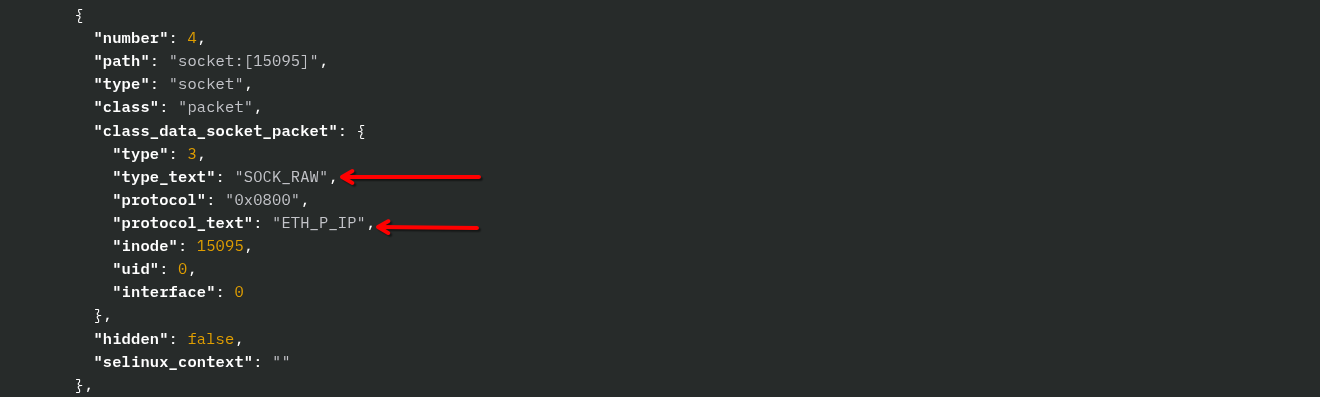
For incident responders, the improved file descriptor forensics from Sandfly is shown below. Here is Version 1 of BPFDoor with open SOCK_RAW sockets grabbing all IPv4 traffic (ETH_P_IP).
Version 2 will show something similar with SOCK_DGRAM sockets open and again all IPv4 traffic.
Version 1 of BPFDoor presents another detection opportunity when it deletes itself after starting. This again is an extremely suspicious event to see on Linux. Version 2 stopped this behavior.
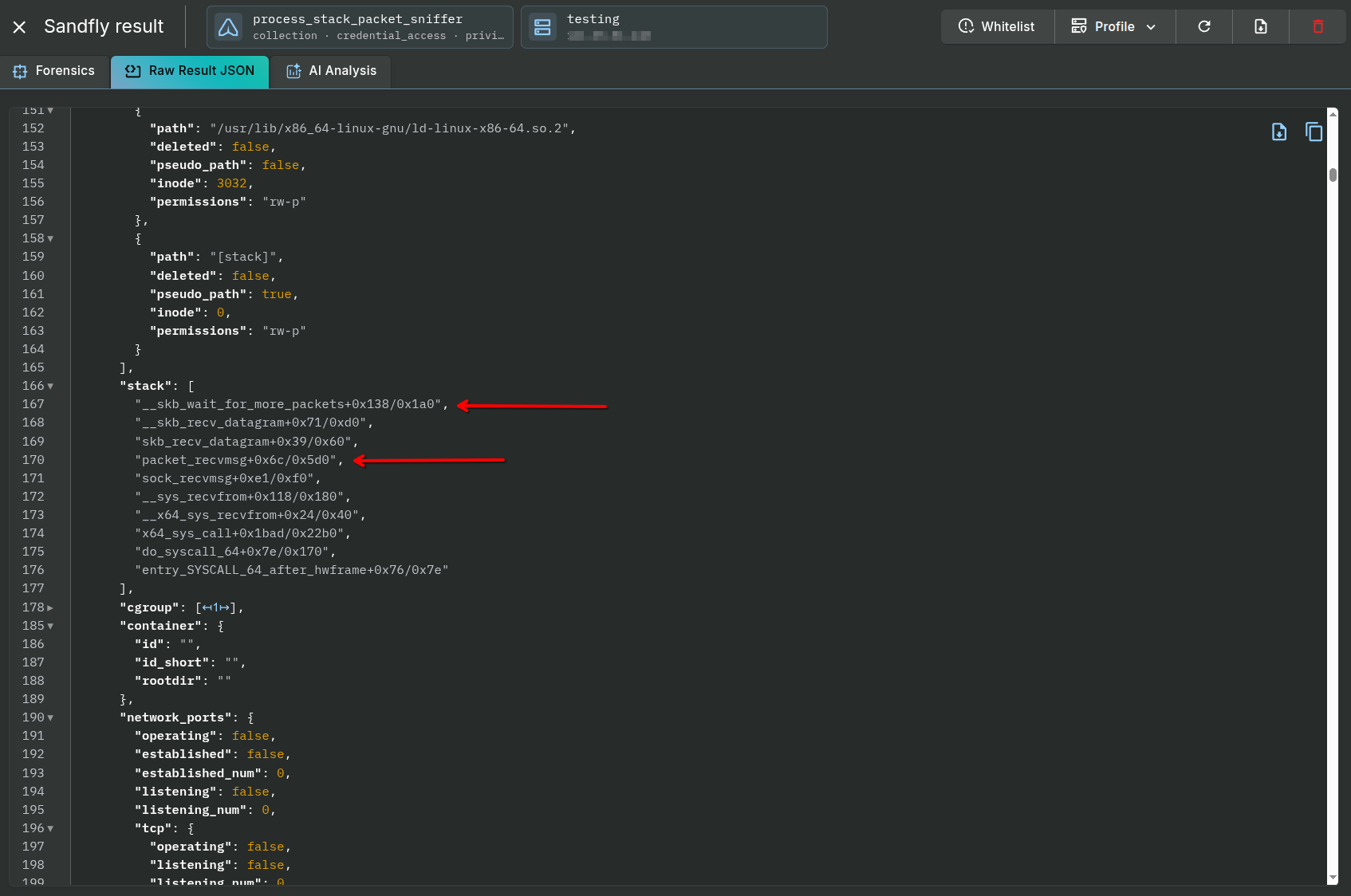
Both versions of BPFDoor show clear network sniffing activity in their process stack data under /proc/PID/stack. Sandfly identifies both versions with an alert like below:
The forensic data shows clear packet sniffing functions present in the process stack of both versions.
Both versions of BPFDoor incorporate process masquerading. Meaning, they will set their process to appear to be something else when run. Version 1 selected from a list of possible names to use at random. Version 2 appears to just use one name which can vary. In the samples we have it would use /usr/sbin/smartd -n -q never. Below we show what Version 2 looks like with a simple ps process list on Linux.
When Version 2 of BPFDoor starts, it overwrites its name with the bogus value and in doing so stomps on its process environment. We detect this problem with the corrupt environment detection seen above, but also a new process_running_sniffer_cmdline_overwrite detection.
This detection specifically looks for sniffing processes that have overwritten their environment with their masqueraded name to hide.
BPFDoor has two modes to activate a backdoor:
The bind shell attaches a command shell to a port on the host and directs the firewall to forward traffic from the attacker to this port after the magic packet is received.
The reverse shell will instruct the host to connect back to the attacker on a listening port once the magic packet is received. This can cause a host to hop a firewall back to the attacker if the firewall allows outbound connections from protected hosts.
In both cases, the shell will give access to the host with elevated privileges (root) as BPFDoor will typically need privileged access to sniff traffic with raw sockets on Linux.
Below we see many alerts generated once the backdoor is activated. In our example, we activated the reverse shell backdoor but detections for the standard bind shell are similar.
Many alerts are generated once the shell is activated and attached to the network:
process_backdoor_bindshell_generic_4 - A generic bind shell backdoor has been detected (multiple variants possible).
process_backdoor_bindshell_login_mode - A bind shell with login mode has been detected.
process_backdoor_bindshell_parent_deleted - A bind shell spawned by a deleted parent process has been detected.
process_backdoor_bindshell_parent_running_from_dev_dir - A bind shell where the parent process is running from /dev (e.g. /dev/shm) has been detected.
process_backdoor_bindshell_pseudo_master_sniffer - A bind shell using a master terminal /dev/ptmx along with sniffer activity has been detected.
process_backdoor_bindshell_sniffer - A bind shell that is sniffing traffic has been detected.
process_environ_history_anti_forensics - A process was started with anti-forensics detected in the process environment.
process_deleted_network_port_established_tcp - A process running from /dev directory that is deleted with open network ports has been detected.
process_network_port_established_running_from_dev_dir - A process running from /dev directory with established network ports has been detected.
process_deleted - A deleted process binary has been detected.
process_running_sniffer_operating_ipv4_traffic - A process sniffing IPv4 network traffic has been detected.
recon_process_list_all - Drift detection has found a new process that is not authorized to be running on this host.
recon_process_list_sniffer_operating - Drift detection has found a new process that is sniffing network traffic running on this host.
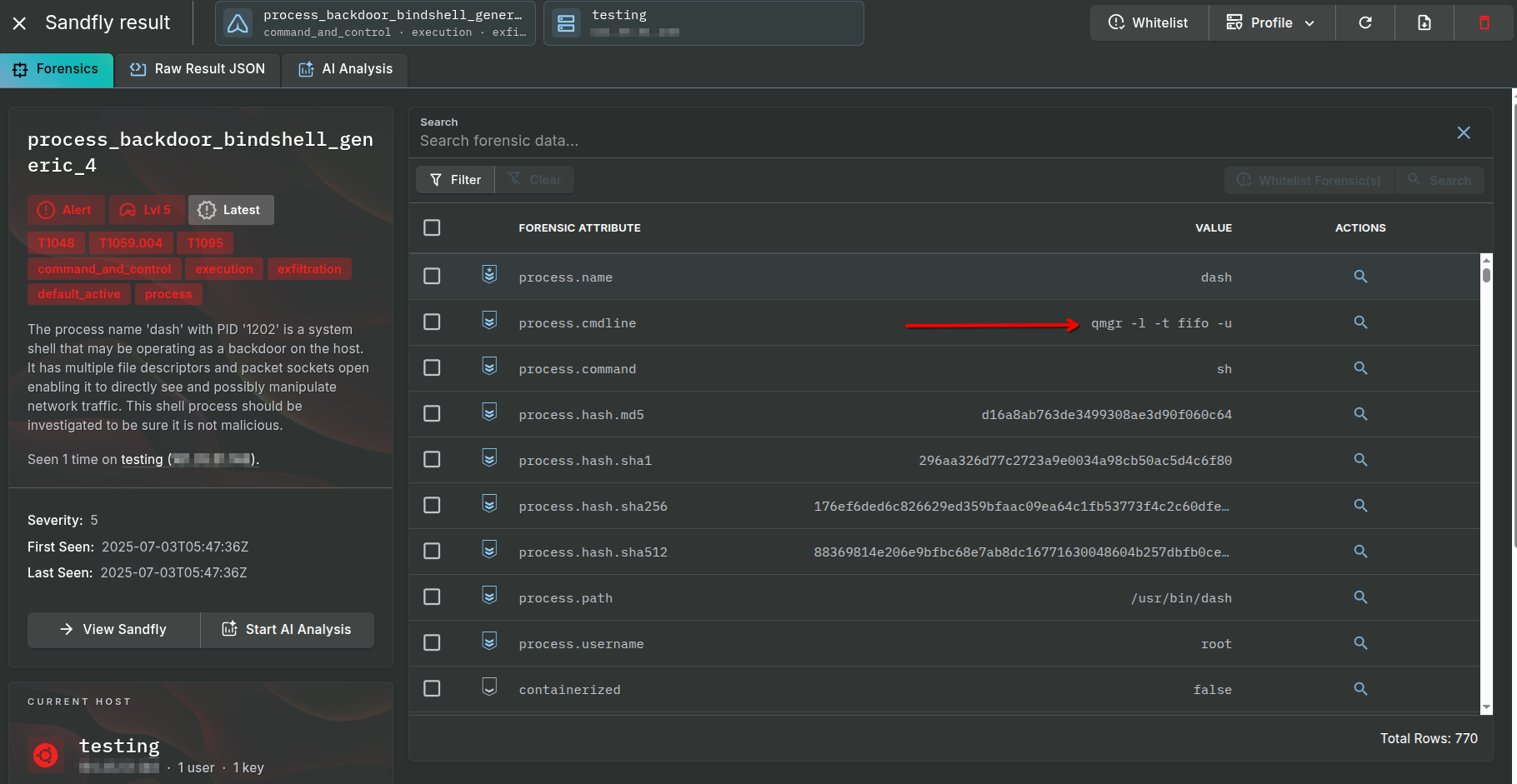
Sandfly generates many alerts about an active bind shell backdoor on hosts. Some of these alerts are below indicating extremely suspicious command shell use. There are many variants of bind shell backdoors and each has unique attributes detected by Sandfly.
The red arrow shows the bogus process name the malware is trying to hide under along with the real name of the shell (dash).
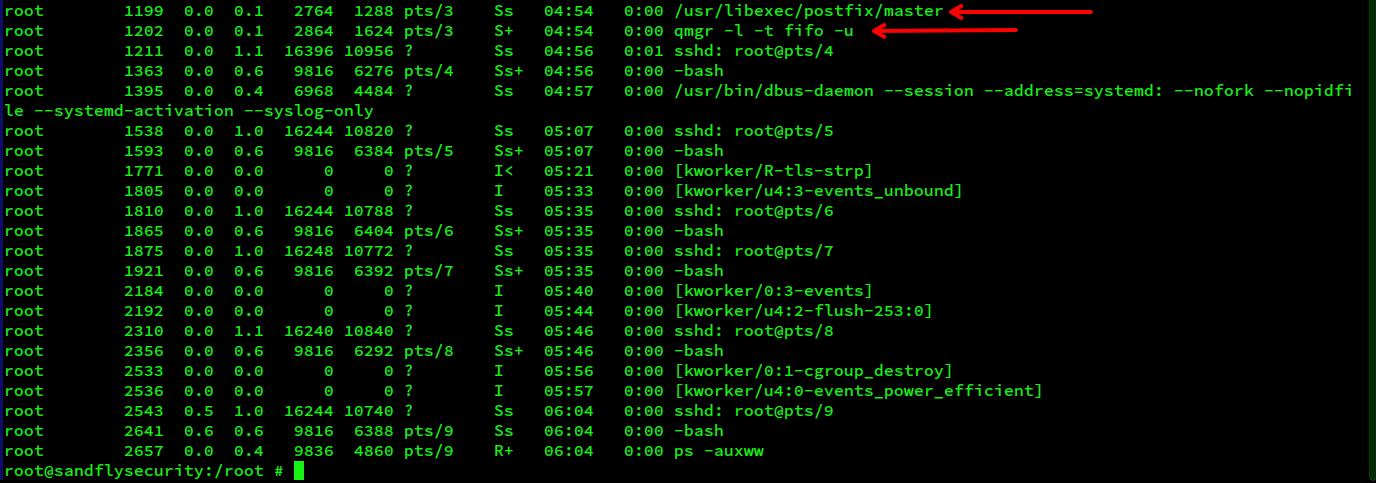
On Version 1, when the shell executes, it hides itself by re-spawning the parent process as /usr/libexec/postfix/master. The shell itself is run under the bogus name qmg -l -t fifo -u. Other names could be used in other variants. The process list below shows what BPFDoor Version 1 looks like from the command line when running the bind shell.
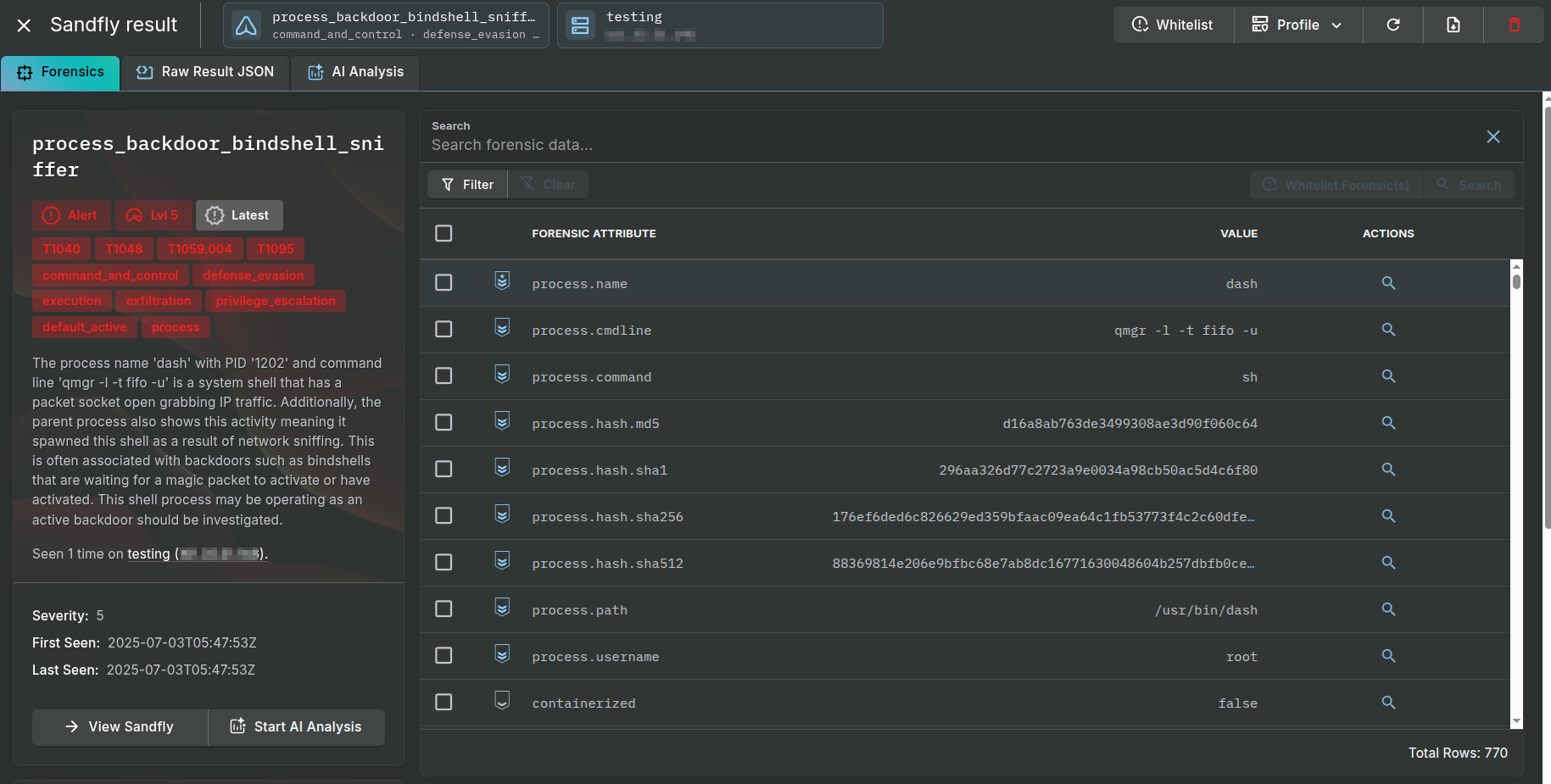
Many more alerts are generated from the BPFDoor bind shell. There will be various bind shell detection alerts shown above with similar forensic attributes.
A common trait with the bind shells is they all inherit the same suspicious sniffer activity at least in Version 1.
Below we see the open file descriptors from the command shell when running. The red arrows indicate again the suspicious areas that this shell is involved in grabbing network traffic either directly or as part of the parent process that spawned it. This is all available in the Sandfly raw forensics data tab on each alert for closer investigation if an alert is generated.
When the backdoor shell is spawned, it incorporates anti-forensics to prevent writing to the history file and other system artifacts. This is identified in the alert below.
Further, we see examples of the anti-forensic values in the process environment forensic data Sandfly collected. Specifically, we see attempts to make HISTFILE not write command shell history by directing it to /dev/null, and something similar for MySQL.
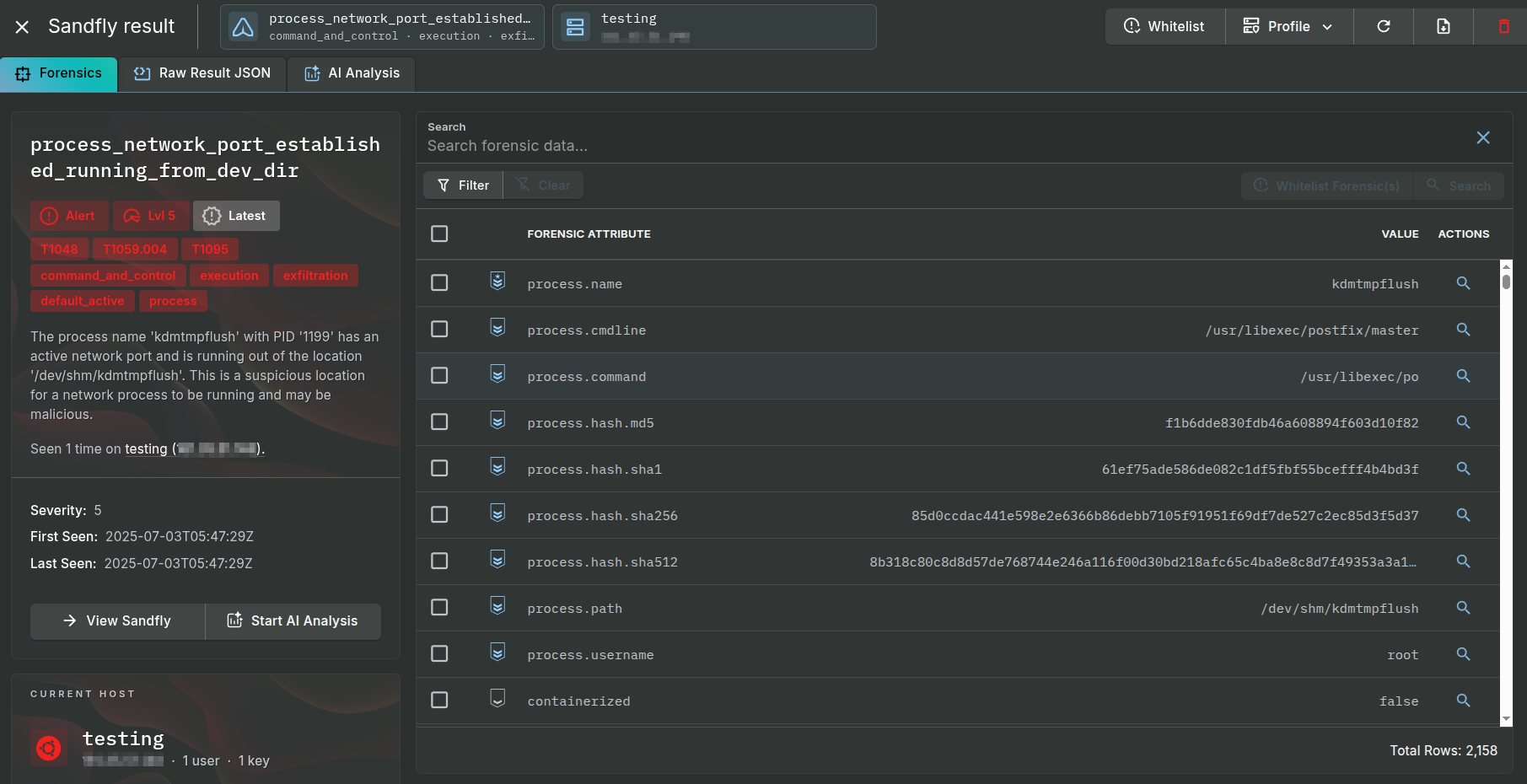
As BPFDoor must communicate with the network for the shell to work, we get additional alerts around network activity. For Version 1, the operation from the /dev/shm directory generates an alert, but we get other alerts as well.
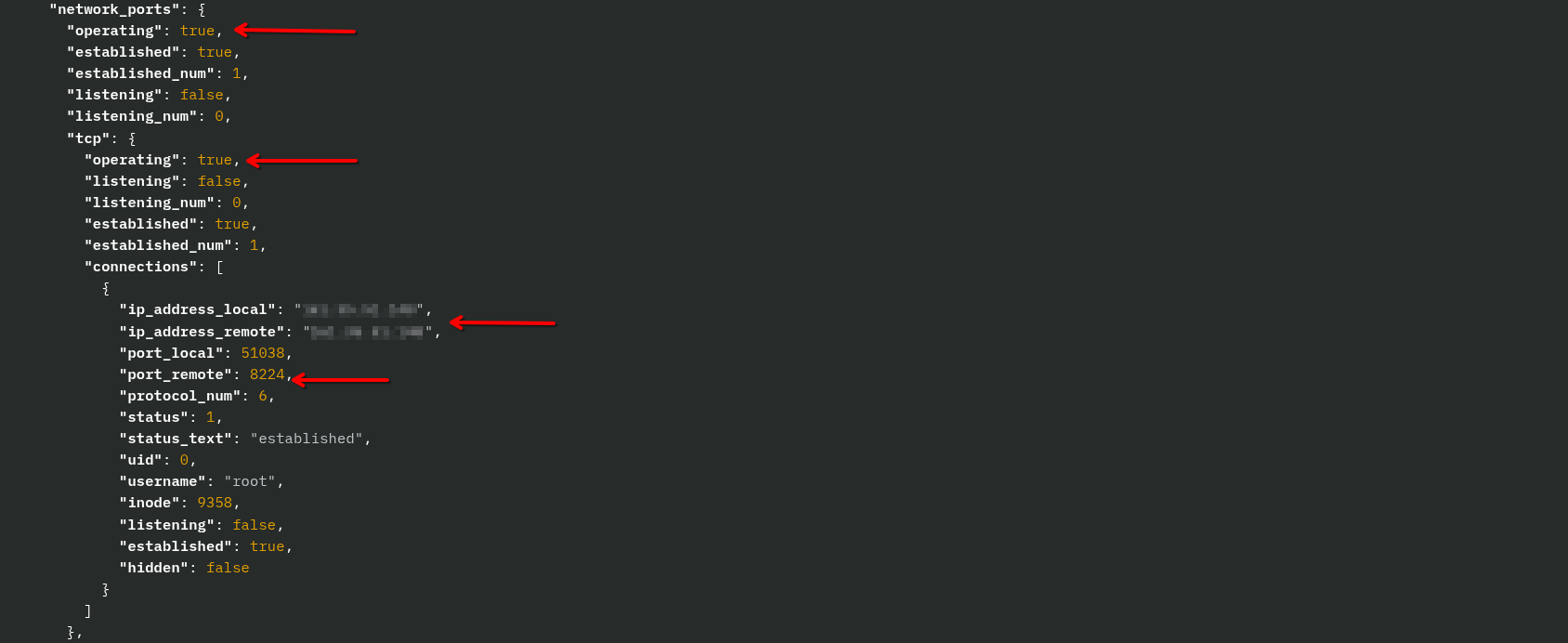
Here Sandfly’s forensic data shows all network activity for the suspicious process. For the bind shell, we see an established TCP connection to a remote system on an unusual port in the reverse shell variant.
Finally, we get the shell itself flagged also as a process with unusual activity concerning sniffing IPv4 traffic. Shell processes should not be involved in sniffing network traffic, so again this is a high risk alert.
A powerful feature in Sandfly is our ability to do drift detection on a system. Sandfly allows customers to profile a system and track what authorized processes, users, files, directories, systemd services, cron jobs, kernel modules, and other critical system areas are running. Users can decide to watch only for new processes, new users, etc. as they deem necessary. There are many uses for this feature described here:
Sandfly Security Agentless Drift Detection
In the basic form, customers can profile a known-good host and then apply that profile to similar systems. For instance, a customer may be running identical Linux Virtual Machine (VM) images that should not change. If a new process, user, etc. were to show up on the monitored hosts, then alerts are generated as a drift from what is expected.
Alternatively, it can be used for incident response by profiling a known-good system, then taking that profile to scan similar hosts and see what is different. For instance, customers can profile a known-good server or network device in their lab. Then, security teams can take that profile to sweep their network of similar systems. Any process or other difference on the scanned systems immediately becomes visible.
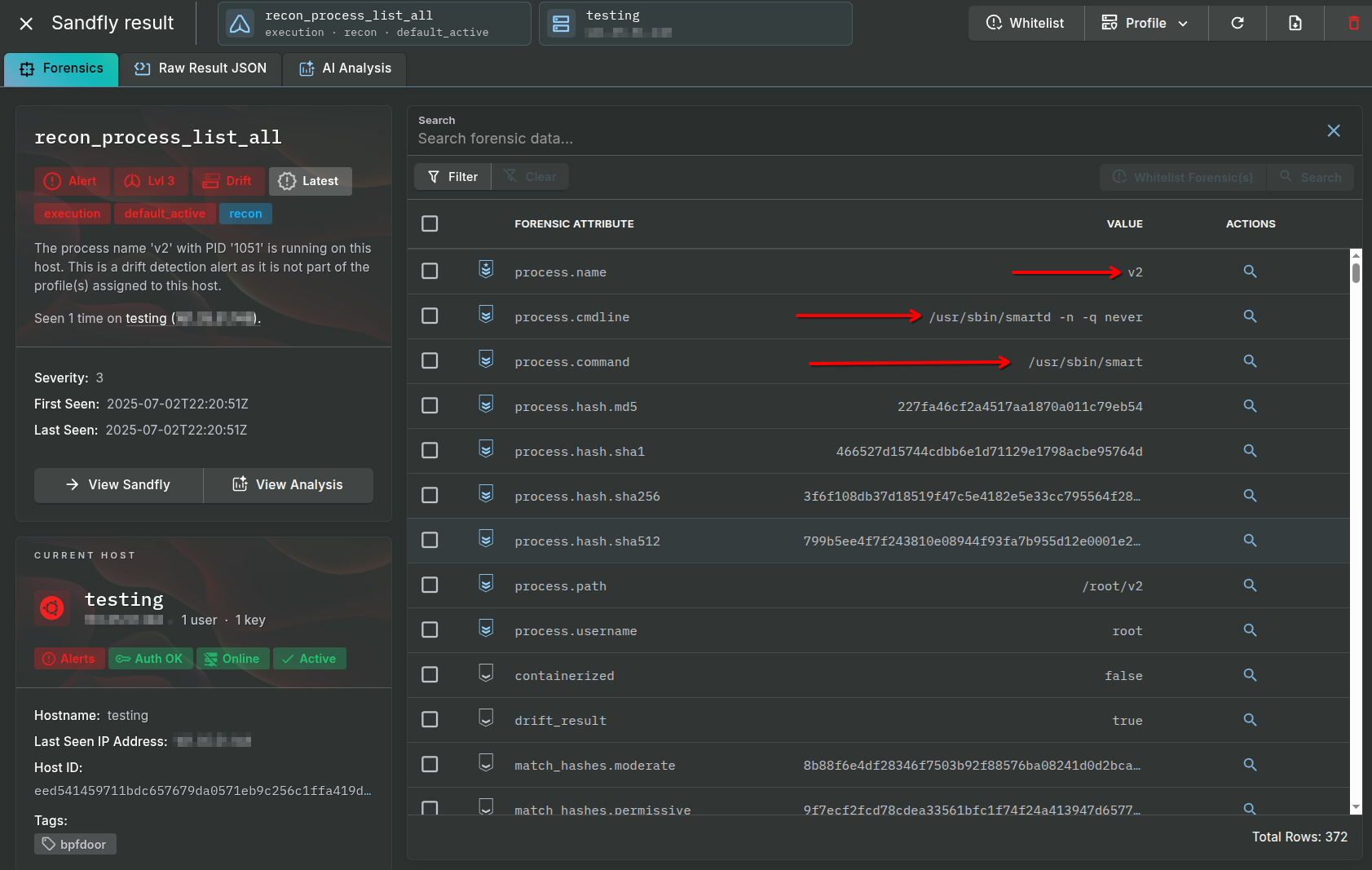
For purposes of BPFDoor, drift detection provides an excellent detection mechanism. If customers know what a system should be running, any new process such as BPFDoor sticks out immediately. Below we see a process drift alert for BPFDoor as an example. The process binary name and masquerading data is immediately shown.
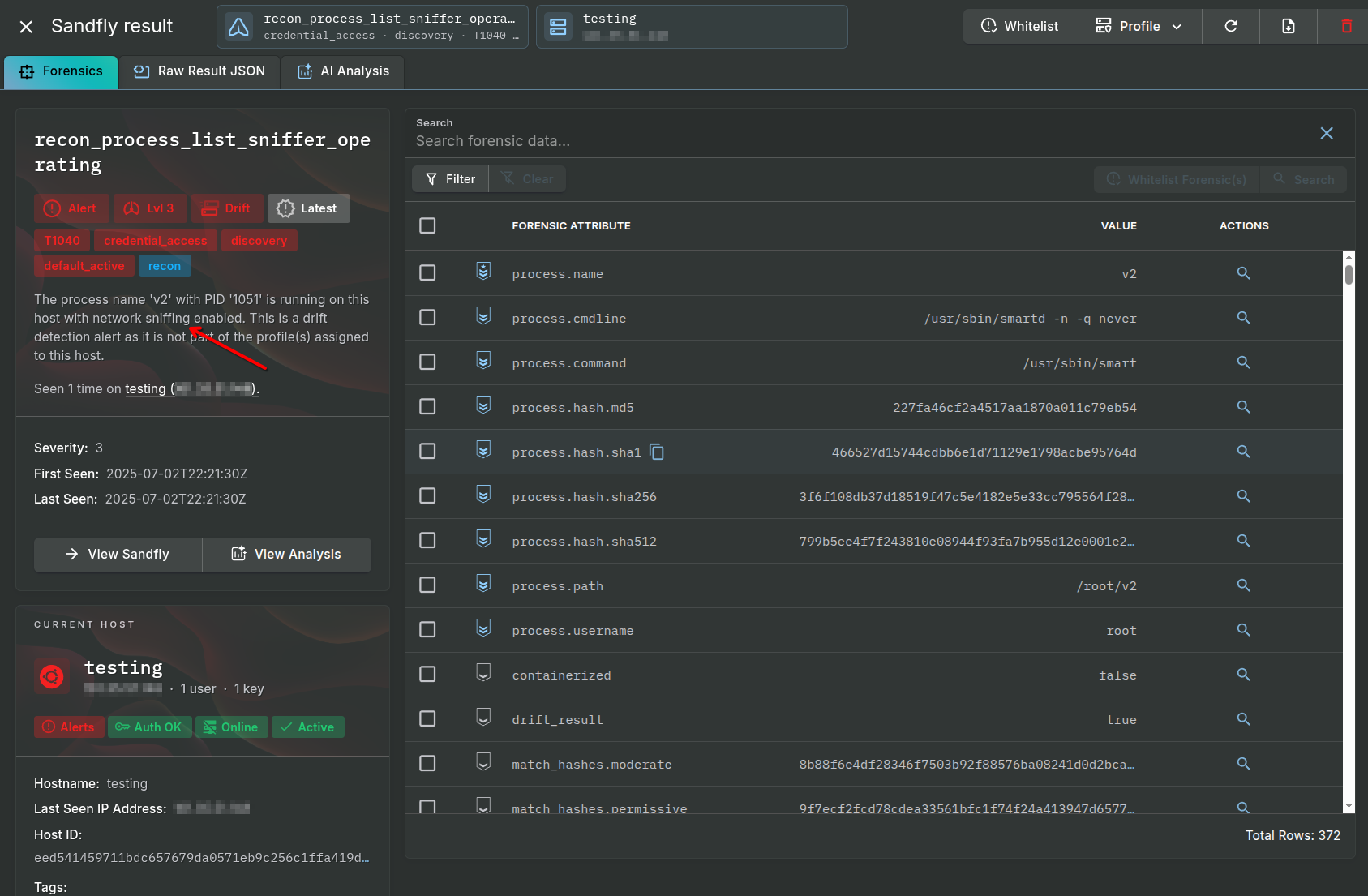
Additionally, customers can use the built in recon_process_list_sniffer_operating to build a list of all processes sniffing traffic. Incident response teams can add known good processes to a result profile or whitelist, and then quickly find sniffing processes which are not authorized on any host. This is an excellent way to identify potential BPFDoor victims.
Many times cryptographic hashes are supplied to help find malware. While this can sometimes work on Windows systems, on Linux it is extremely unreliable. We do not recommend using cryptographic hashes as a primary detection strategy for any Linux malware. It is trivial on Linux to alter a binary hash and have it completely evade detection using cryptographic hashes. We even show how to do it in this video:
Stop Using Cryptographic Hashes to Find Linux Malware
With that said, sometimes using hashes can be helpful for malware that has not changed yet. In this case, customers can use Sandfly’s built in Threat Feed feature. This feature allows you to tie into public threat intel sources or use your own list of hashes at a dedicated URL.
Configuring threat feeds on Sandfly is very easy and documented below. Customers can use commercial feeds, free feeds, or even internal feeds they maintain on their own.
Sandfly Threat Feed Configuration
When any process or file is collected by Sandfly, it generates SHA512, SHA256, SHA1 and MD5 hashes. These are compared against threat feeds lists and if there is a match an alert is generated. Below we see an alert for a BPFDoor Version 2 binary from a threat feed.
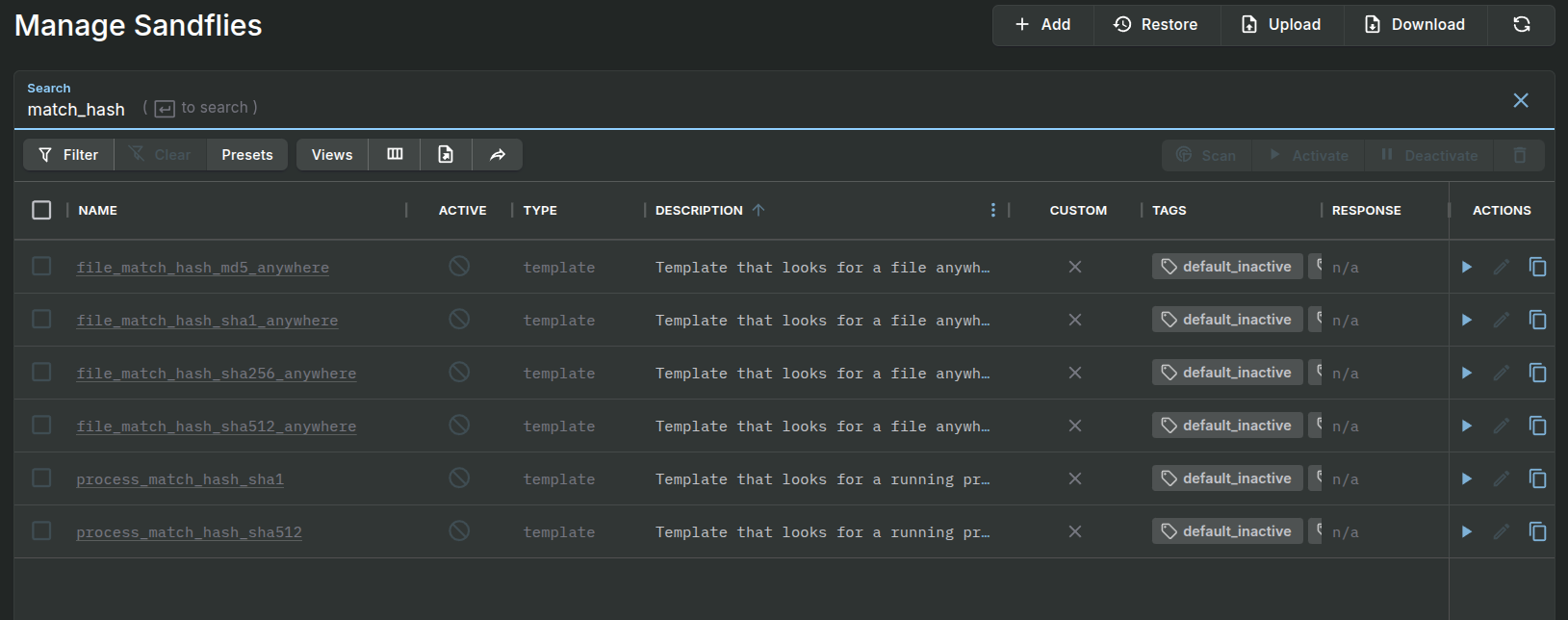
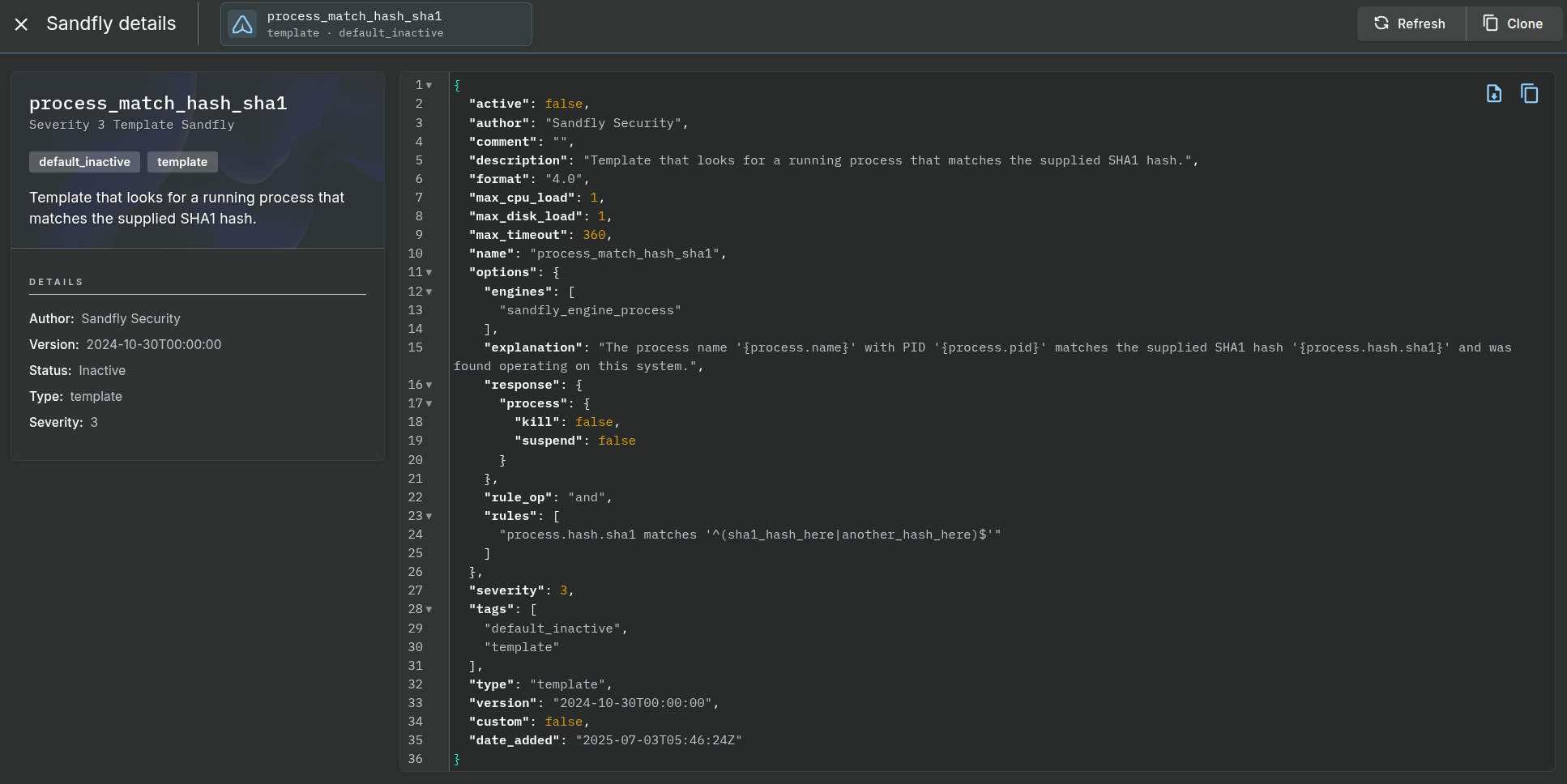
Customers can also create on-demand hash searches. For instance, searching for “match_hash” under the Sandflies area will list several templates that can be cloned and converted into hash search modules. If you need assistance in doing this, please reach out to our support team for assistance.
In most cases, if you wish to search for process hashes it will be easier to make your own threat feed hash list and use the Threat Feed feature. Again, please reach out to support if you need help with this.
Below we show a list of the hash match templates, and the template for process hash matching. Sandfly can search for process and file hashes, but it can also search inside files, systemd services, cron entries, at jobs, user entries, and more.
The detection modules discussed so far are all enabled by default. They have low false alarm risk and provide exceptional coverage for BPFDoor variants we’ve seen. However, we have some additional modules that incident responders can enable if they want to widen the net at the risk of higher false positive risks.
process_running_sniffer_libraries_libpcap - Show all sniffers using libpcap libraries for packet capture.
process_running_sniffer_operating - Show any process sniffing any kind of traffic.
process_running_sniffer_operating_tuned - Show any process sniffing traffic, but ignore some common system services that do it.
process_running_sniffer_operating_all_traffic - Show any process sniffing traffic set to grab all traffic regardless of protocol.
process_masquerade_shell - Show any shells that may be masquerading under a false name.
process_masquerade_check - Show any process that may be masquerading under a false name.
process_masquerade_binary_renamed - Show any binary that has been renamed to masquerade what it is.
These modules may provide additional detection coverage, but may not be worth the possible extra false positive risks. Security teams can try them in their environment to see if they are useful however.
Sandfly provides excellent and very reliable Linux forensics data. As a result, our AI integration feature starting in Sandfly 5.5 and higher provides extremely good analysis and investigation advice. Below we see an analysis of an alert from BPFDoor Version 2 when found on a system.
BPFDoor is a simple but effective backdoor that has been widely used to attack telecommunications and other critical infrastructure providers globally. While it contains many evasive features, it can be easily found by Sandfly in seconds without needing to deploy endpoint agents. If you are experiencing a breach, please reach out to our team and we can supply an Incident Response license to help.
Sandfly is compatible with Linux systems over a decade old to modern cloud deployments. We also work on air-gap and mixed architecture environments using Intel, AMD, ARM, MIPS, and IBM CPUs. Sandfly can work not just on traditional servers, but embedded systems and IoT devices with high compatibility and very low risk of downtime. With no endpoint agent, Sandfly deploys instantly and can give answers in seconds about the security state of Linux systems.
Please visit our website for more information:
Sandfly Security BPFDoor Research
BPFDoor - An Evasive Linux Backdoor Technical Analysis
HaxRob BPFDoor Research
Post Tags:
Share this post:
Evasive Linux malware and backdoor detection presentation featuring BPFDoor and command line forensics.
A full breakdown of Linux malware, from cryptominers to BPFDoor and stealth rootkits, presented at an Ericsson conference for critical infrastructure.
BPFDoor is an stealthy Linux backdoor operating for years undetected. We disclose full technical details and detection techniques here.