Ask most security teams how they'd deploy endpoint detection and response (EDR) across a fleet of Linux hosts, and you'll hear a familiar refrain: Kernel modules that break on the next patch. Agents that need to be maintained across a dozen distributions and kernel versions. Performance overhead nobody signed up for. Plus, the machines you most want to watch such as the ancient appliance, the locked-down critical infrastructure box, the system you're not allowed to touch, are exactly the ones where you can't install anything at all.
This is the gap agentless Linux EDR was built to close. Instead of forcing an agent onto every host, agentless EDR uses the access you already have and trust: SSH. In this post we want to explain how SSH-based visibility works, why it's particularly good at catching threats like stealth rootkits, and how doing more than just EDR can help secure systems efficiently.
Why Agents Are the Hard Part of Linux Security
Traditional endpoint detection and response agents are a difficult problem on Linux. When they work, they can give good insight. The problem though is that Linux is not one operating system. Rather, Linux is a number of distributions, running thousands of kernel versions, on everything from cloud instances to embedded industrial controllers. A kernel-level agent that works perfectly today can panic a box after the next update. Multiply that risk across a large fleet and the maintenance burden becomes its own security problem. Often, agents may not get deployed or updated, leaving massive visibility gaps where attackers can hide.
Then there are the hosts you simply can't touch. The database servers, the network devices, the legacy and specialty systems running a process that can't go down. All of these often forbid third-party agents entirely, whether by policy, warranty, or plain operational risk. These are frequently the highest-value targets on the network, and the agent model leaves them dark, putting mission-critical infrastructure at risk.
SSH: Access You Already Have and Trust
Agentless EDR takes a different path. Every Linux administrator already manages hosts over SSH. It's authenticated, encrypted, universally available, and it's a channel your security operations team already governs.
Sandfly connects to a host over SSH, deploys a purpose-built collector to gather forensic data, runs its analysis, and then removes itself completely. Nothing is left installed. There's no persistent process, no kernel module, no daemon to maintain or update across the fleet. The next time you need to inspect that host, the platform does the same thing again.
This means every host that speaks SSH is reachable, whether it's a bleeding-edge cloud VM or a decade-old appliance. You get consistent Linux security coverage across the enterprise without carrying the weight of an agent on any of it.
Finding Linux Rootkits Over SSH
Here's where it gets interesting, and where Sandfly's agentless collection turns out to be more than just a convenience.
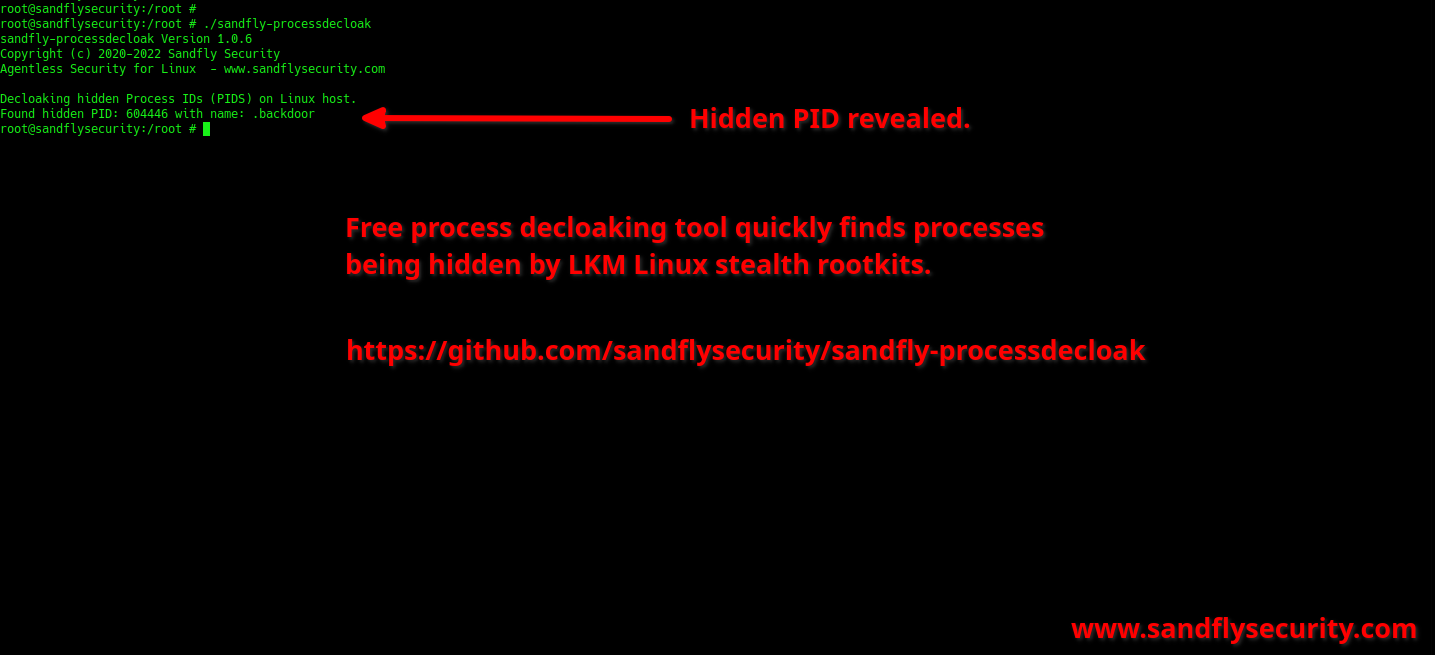
If you run standard commands like ps, ls, or top on a compromised host, you are trusting the very binaries an attacker may have replaced or altered. A stealth kernel rootkit doesn't announce itself. Rather, it hooks into the system precisely so that the tools you use to look for it lie to your face. Ask the system what's running, and the rootkit simply edits itself out of the answer. This is why rootkit detection built on standard OS libraries and utilities can be unreliable: you're interviewing a witness the attacker has already coached. We've directly seen agent-based systems blinded by stealth rootkits. Further, blinding and disabling EDR agent telemetry is becoming a mainstream tactic on Windows and Linux.
Agentless EDR refuses to take the host's word for the data it collects. Sandfly's purpose-built forensic engines bypass the standard OS layers and go looking for the discrepancies a rootkit can't hide: a process that is evading detection, a network connection that's active but cloaked, or a file present on disk but invisible to ls and other directory tools. These inconsistencies between what the system claims and what the system actually contains are the fingerprints of a stealth compromise, and surfacing them is a specialty for Sandfly.
More Than EDR: Closing the Doors Attackers Walk Through
Rootkits are what happens after an attacker is already inside. The same SSH-based collection that decloaks them is just as effective at finding the weaknesses that let attackers in to begin with, and that's where agentless EDR quietly becomes more than EDR.
Once Sandfly is on the host gathering forensic data, it's already looking at exactly the artifacts that decide whether a host is easy to compromise. SSH keys are the obvious example. On a large fleet, authorized keys accumulate for years. Nobody remembers who added them, whether the private half still exists on a laptop that left the company, or whether a key you banned in one place is quietly still trusted somewhere else. Sandfly inventories those keys across every host over the same SSH channel, so you can spot the banned key that's still authorized, the key shared across systems that shouldn't share one, and the credentials that outlived the person who created them.
Passwords are the other open door. Weak, default, or reused passwords on privileged accounts are still one of the most reliable ways onto a Linux host, and they don't show up in any log until they're used against you. Sandfly audits credentials across the fleet, surfacing the admin and default accounts with guessable passwords before an attacker does. This is the kind of security hygiene that's tedious to chase host by host and nearly impossible to do with an agent. Yet, it falls out naturally when you can reach every host over SSH and inspect it directly the way Sandfly does.
The payoff is a single agentless pass that covers both sides of the problem. You hunt for the attacker who may already be hiding, and in the same motion you close the SSH key and password weaknesses that invite the next one. That combination is hard to get from traditional detection approaches.
What This Means for Your Security Operations
For an enterprise Linux security team, the agentless model changes the math in a few concrete ways.
You get coverage without a deployment project. Any host reachable over SSH is in scope immediately: no agent rollout, no per-distribution packaging, and no waiting on change windows to install software on sensitive boxes. Your security posture improves because the systems that couldn't take an agent are no longer blind spots.
Next, you get consistency. Because the collector runs the same way every time, you gather a standardized, predictable baseline across the fleet rather than a patchwork of agents at different versions and states of health. That repeatability is the foundation needed for good security monitoring on Linux.
Finally, you get results you can trust because the data comes from forensic engines designed to defeat exactly the hiding techniques serious attackers rely on, rather than from system libraries and tools a rootkit may have already turned against you.
The Foundation Under Everything Else
Agentless Linux EDR isn't a compromise you make because agents are too much trouble. Used well, SSH-based collection is a strong approach on the hosts that matter most: the ones you can't touch, the ones running critical processes, and the ones an attacker has worked hardest to hide inside.
The future of Linux security isn't about installing more on your endpoints. Rather, it's about getting to the truth on every host with reliability, safety, and speed without exception. No blind spots allowed.
See It on Your Own Hosts
The fastest way to understand what agentless Linux EDR can find is to point it at your own fleet. Request a demo of Sandfly and watch it hunt for rootkits, stealth compromises, and hidden persistence across your Linux and critical infrastructure hosts agentlessly, without leaving a trace. Bring your hardest-to-reach box. That's exactly the one we want to show you.